
Have restricted shared folders setup with our best practices. As an efficient quick-start to setting up your own FTP/SFTP site, Hosted~FTP~ recommends to follow the F.U.S.N tutorial acronym to easily have your site setup with our best practices.
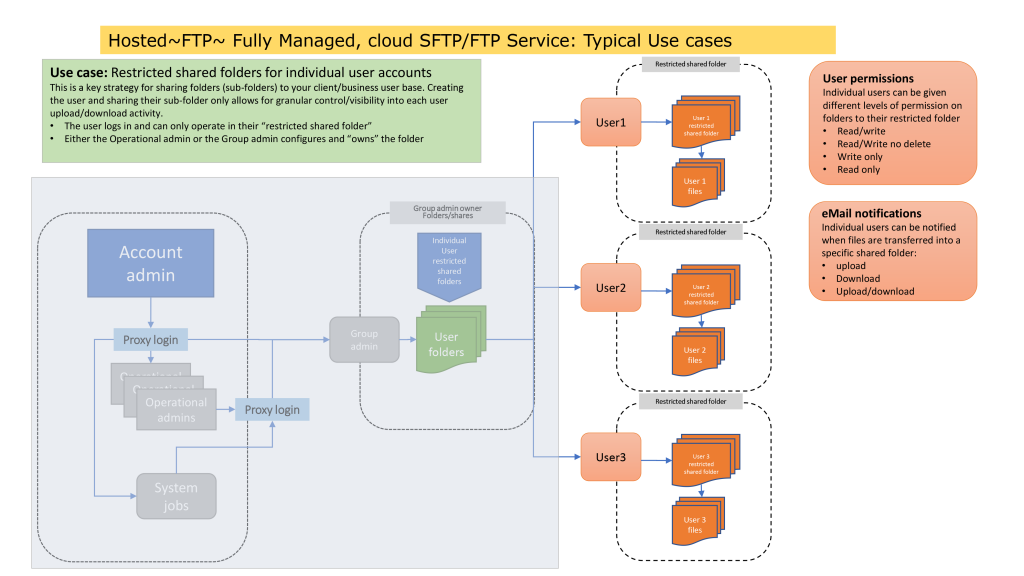
FUSN: Folders (F) Username (U) Sharing (S) Notifications (N) #
Click on each link below to find out more details for each step of the restricted shared folder setup.
- Folders (link) – Create a main folder for your entire infrastructure then use sub-folders to separate your different clients, vendors, departments etc.
- Usernames (link) – Create and setup usernames for different access types and security requirements.
- Sharing (link) – Create a restricted shared folder setup by setting different types of access for each sub-folder.
- Notifications (link) – Setup email notifications for upload, download or both for each user or yourself as the admin.
Video Tutorial #
For a detailed step-by-step best practice setup with the F.U.S.N acronym, please see the video below:


